How to Install a Bluetooth Headset on Your Motorcycle Helmet ?
If you’ve just bought a motorcycle Bluetooth headset, the next step is proper installation. A correctly installed headset ensures clear communication, music streaming, GPS navigation, and safe hands-free calls while riding. This guide will walk you through how to install a headset on a motorcycle helmet step by step.
Why Install a Bluetooth Headset in Your Helmet?
A Bluetooth helmet headset is more than just a gadget – it’s a safety and convenience upgrade. With it, you can:
-
Stay connected with riding partners via intercom.
-
Enjoy noise-canceling music or radio.
-
Follow GPS directions hands-free.
-
Take calls without stopping your ride.
Installing your headset correctly makes sure you get the best sound quality and comfort.
Step-by-Step Guide: Installing a Bluetooth Headset in a Motorcycle Helmet
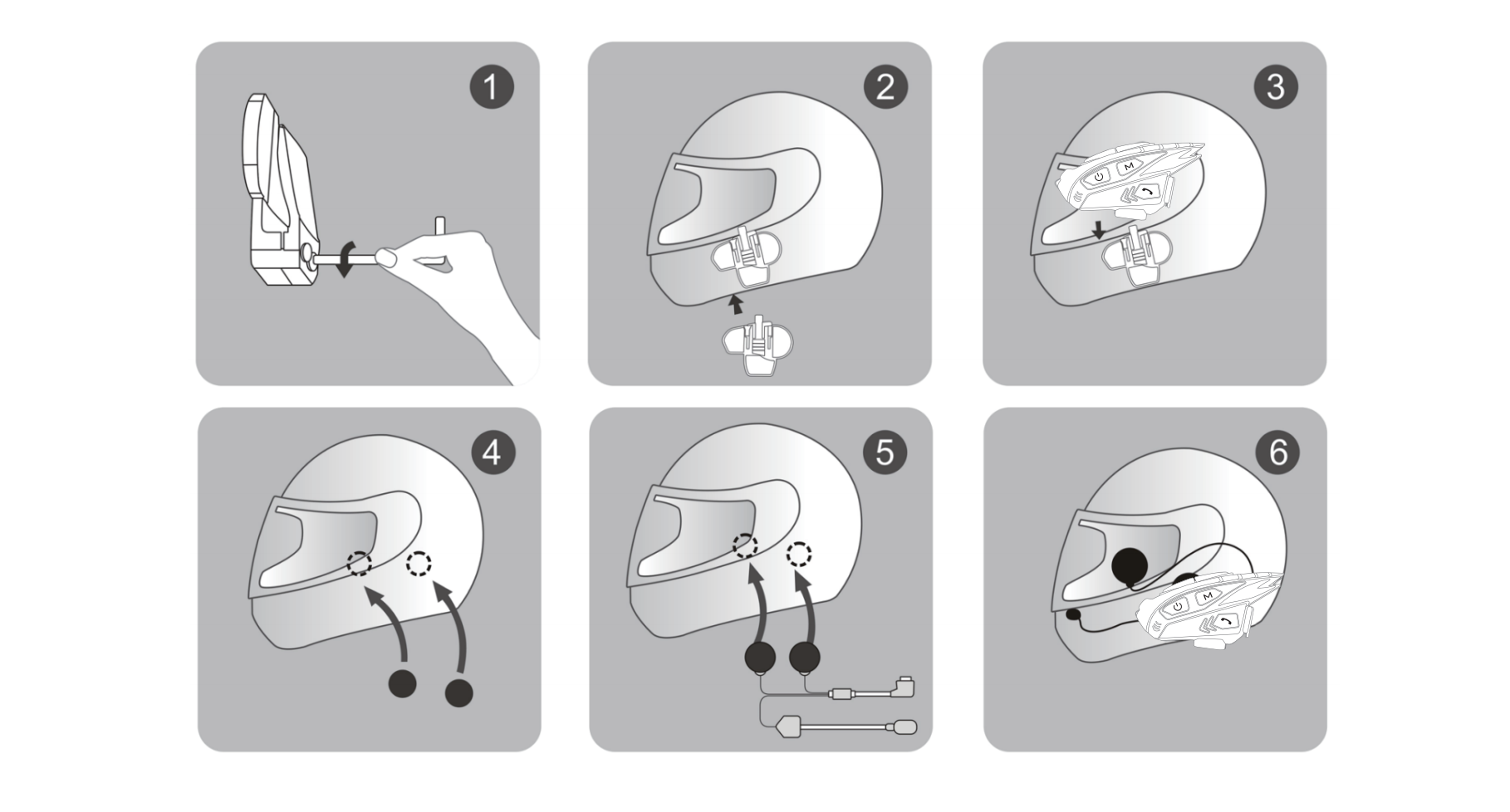
1. Prepare Your Helmet and Headset
Check if your helmet has ear cut-outs or speaker pockets. Most full-face, modular, and open-face helmets are compatible with Bluetooth headsets(check the helmet style suit for your headset ). Make sure you have the full kit: speakers, microphone, control unit, and mounting accessories.
Keywords to note: motorcycle helmet headset installation, Bluetooth headset setup.
2. Position and Mount the Speakers
-
Gently remove the inner cheek pads or liners of your helmet.
-
Place the speakers at ear level inside the helmet’s cut-outs.
-
Secure with Velcro or adhesive pads provided.
-
Test the position by wearing the helmet – adjust if the speakers feel uncomfortable.
3. Install the Microphone
-
For full-face helmets, use the wired microphone near your mouth.
-
For open-face or modular helmets, attach the boom microphone inside the chin bar.
Make sure the mic is close enough for clear voice pick-up but doesn’t touch your lips.
4. Mount the Bluetooth Control Unit
Most riders install the control unit on the left side of the helmet for easy access.
-
Use the clamp mount or 3M adhesive pad included in your kit.
-
Route the wires neatly along the helmet lining to avoid distractions or discomfort.
5. Refit Helmet Padding and Test the Setup
-
Replace all padding securely.
-
Power on your headset and pair it with your smartphone or GPS.
-
Test:
-
Music clarity
-
Intercom connection
-
Microphone sensitivity
-
Button accessibility with gloves
-
6. Adjust for Comfort and Safety
Take a short ride to test your setup. If the audio is too low, adjust the speaker placement. If the mic isn’t clear, reposition it slightly closer.
Safety Tip: Never drill or permanently modify your helmet, as this can compromise its protective structure.
Pro Tips for Motorcycle Bluetooth Headset Installation
-
Always check if your helmet is listed as Bluetooth headset compatible.
-
Keep wiring tucked neatly to avoid pressure points.
-
Charge the headset fully before your first ride.
-
Test the volume at different speeds to ensure clarity.